AI-Powered Visual Regression Testing for Startups: How to Ship Pixel-Perfect Releases Without Slowing Down Development
A beginner-friendly, SEO-optimized guide for startups to understand AI-powered visual regression testing, why modern teams use it, real examples of UI failures, common pain points, and how combining traditional testing with AI helps catch critical visual bugs early.
Why This Topic Matters
In modern software development, product teams move fast—sometimes a little too fast. Buttons shift, text overlaps, colors break, components resize differently across devices, and suddenly your clean UI looks like it was designed by a sleepy raccoon at 3 AM.
Traditional testing tools catch functional bugs well, but when the issue is purely visual—misaligned UI, broken CSS, wrong font size—they often fail. This is where AI-powered visual regression testing steps in, helping teams catch pixel-level issues before users do.
This blog makes visual testing simple, especially for founders, product managers, and early-stage engineering teams.
Real-World Scenarios
Scenario 1: The Disappearing “Buy Now” Button
Your marketing team launches a campaign, traffic increases—and suddenly the “Buy Now” button is pushed off-screen on mobile due to a small CSS change. Revenue quietly drops.
Scenario 2: The Broken Dashboard After a Release
Developers fix one card component, accidentally shifting the entire dashboard layout. Users start complaining:
“Why does everything look… weird today?”
Scenario 3: Dark Mode Gone Wrong
Adding dark mode causes half the text to turn black on a black background.
Your UI now looks like a magic trick—elements are technically there, but invisible.
Real-World Pain Points
Tiny UI changes create big business losses (missed conversions, confused users).
Manual visual checks are slow, inconsistent, and exhausting.
Developers cannot catch visual defects reliably—they focus on logic, not design.
Traditional automation tools do not detect visual shifts.
Screenshots differ slightly across devices, creating noise.
Limited QA bandwidth in early-stage startups.
Visual bugs go live because they’re “not breaking the code.”
Modern startups simply cannot keep up with visual QA manually.
Solutions for These Pain Points
Solution 1: Use Baseline vs. New Screenshot Comparison
Visual regression tools create a baseline snapshot and compare every new build against it. Even subtle shifts become visible.
Solution 2: Layer AI on Top of Visual Testing
AI models identify:
Misaligned elements
Wrong colors
Font inconsistencies
Component spacing issues
Partial visibility
Overlapping elements
Missing icons/images
AI also reduces false positives by understanding intent, not just pixels.
Solution 3: Automate on Every Pull Request
Integrate visual checks into CI pipelines so broken UI never reaches production.
Solution 4: Multi-Device & Multi-Resolution Comparison
Test across desktop, mobile, tablet, iPad, and responsive layouts—automatically.
Solution 5: Prioritize Critical User Journeys
Home page
Login
Checkout
Payment
Dashboard
These should always have visual baselines.
Solution 6: Combine Traditional + AI Testing
The winning formula for startups:
Functional Tests + Visual Tests + AI Analysis = Zero UI surprises + faster releases.
Example Gemini AI Model Code Snippet (ES Modules)
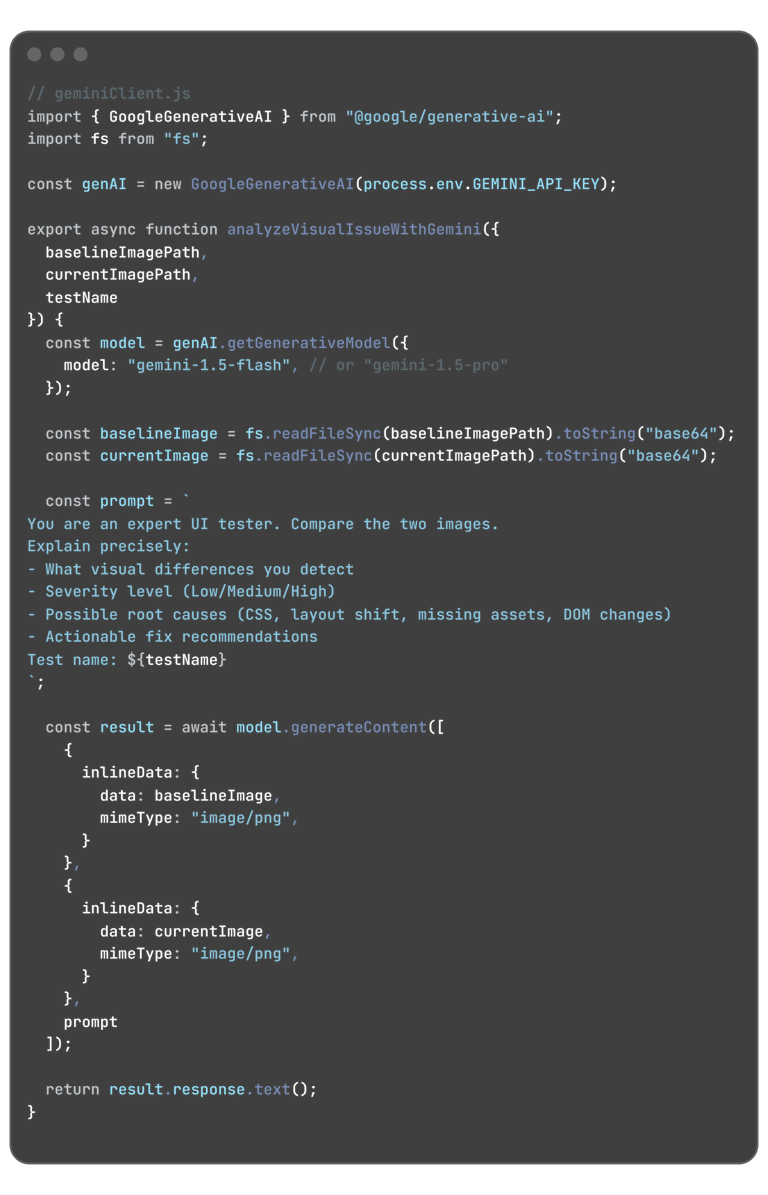
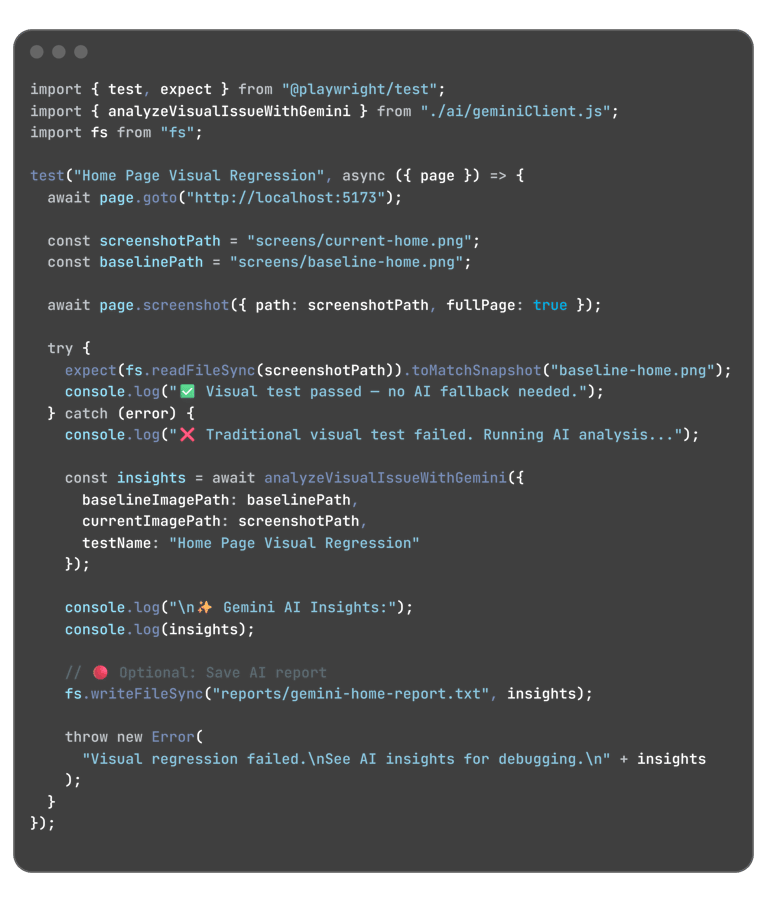
This snippet shows how to send a failed screenshot + baseline screenshot to Gemini for visual-diff + reasoning.
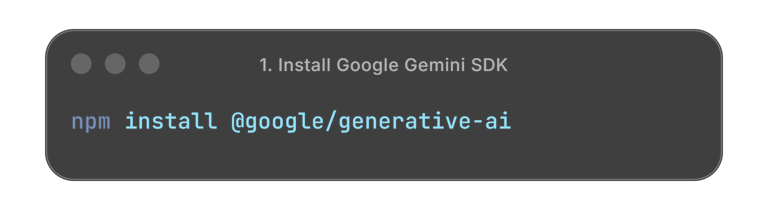
1. Install Google Gemini SDK
3. Usage inside your Playwright Test (AI-Fallback Flow)
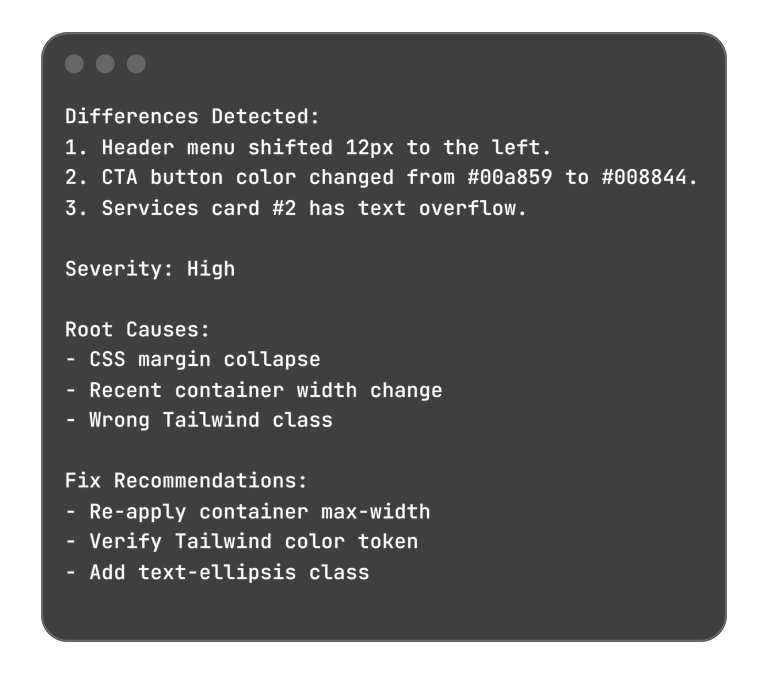
🔥 Gemini Output Example (You will see something like this)
2. Create a helper geminiClient.js
How Qanade Can Help
If a startup wants to implement AI-powered visual testing without complexity, Qanade can set up the entire workflow—from Playwright baseline photos to AI comparison reports—so teams ship faster, with a UI that always looks sharp and professional.
contact@qanade.com
Pune, Maharashta, India.
“Quality is never an accident; it is always the result of intelligent effort.” — John Ruskin


